Takeaway
Achieving exceptional code quality in Unreal Engine is not merely an aesthetic preference; it’s a fundamental pillar for sustainable development, robust performance, and long-term project viability. This article delves into advanced strategies and best practices for elevating your Unreal Engine codebase to an expert level.
The Imperative of High-Quality Code in Unreal Engine
In the demanding landscape of game development, particularly with a powerful and complex engine like Unreal, code quality directly correlates with project success. Poorly written, unoptimized, or unmaintainable code leads to a cascade of issues: increased bug counts, performance bottlenecks, extended debugging cycles, difficulty in implementing new features, and ultimately, developer burnout. For a game development company, these issues translate directly into missed deadlines, budget overruns, and a compromised final product. Conversely, a high-quality codebase fosters agility, reduces technical debt, facilitates collaboration, and ensures the game can evolve and scale effectively.
Architectural Purity: Designing for Scalability and Maintainability
The foundation of high-quality code lies in its architecture. In Unreal Engine, this often involves a thoughtful blend of C++ and Blueprints, leveraging each for its strengths. A common pitfall is the “Blueprint Spaghetti” anti-pattern, where complex logic is crammed into Blueprints without proper structure, leading to unreadable and unmaintainable graphs. Conversely, over-engineering everything in C++ can lead to unnecessary compilation times and reduced iteration speed for designers.
Data-Oriented Design (DOD) and Entity-Component-System (ECS) Principles: While Unreal Engine’s native Actor/Component model is object-oriented, incorporating principles from DOD and ECS can significantly improve performance and maintainability, especially for systems dealing with large numbers of similar entities. Instead of having every Actor manage its own state and logic, consider centralizing data and processing it in a cache-friendly manner. For example, a custom movement system might process all movable entities’ positions and velocities in a single pass, rather than each Actor updating itself independently. This approach, while requiring a deeper understanding of memory layouts and CPU caches, can yield substantial performance gains, particularly on modern multi-core processors. (Source: “Data-Oriented Design” by Richard Fabian, 2009).
Modularization and Loose Coupling: Break down your game into distinct, self-contained modules. Each module should have a clear responsibility and minimal dependencies on other modules. This can be achieved through well-defined interfaces (C++ abstract classes or Blueprint interfaces), event dispatchers, and careful management of dependencies. For instance, a “Combat System” module should not directly depend on a “UI System” module; instead, it should broadcast events that the UI system can subscribe to. This reduces the impact of changes in one part of the codebase on others, making refactoring and feature additions much safer.
Unreal Engine’s Module System: Leverage Unreal’s built-in module system to enforce architectural boundaries. Group related classes and assets into their own modules. This not only improves compilation times but also makes it easier to manage dependencies and distribute parts of your game as plugins. For example, a core gameplay module, a UI module, and a networking module can be distinct Unreal modules, each with its own build rules and dependencies.
C++ Best Practices: The Backbone of Performance and Robustness
For performance-critical systems and complex logic, C++ remains the language of choice in Unreal Engine. Adhering to strict C++ best practices is paramount.
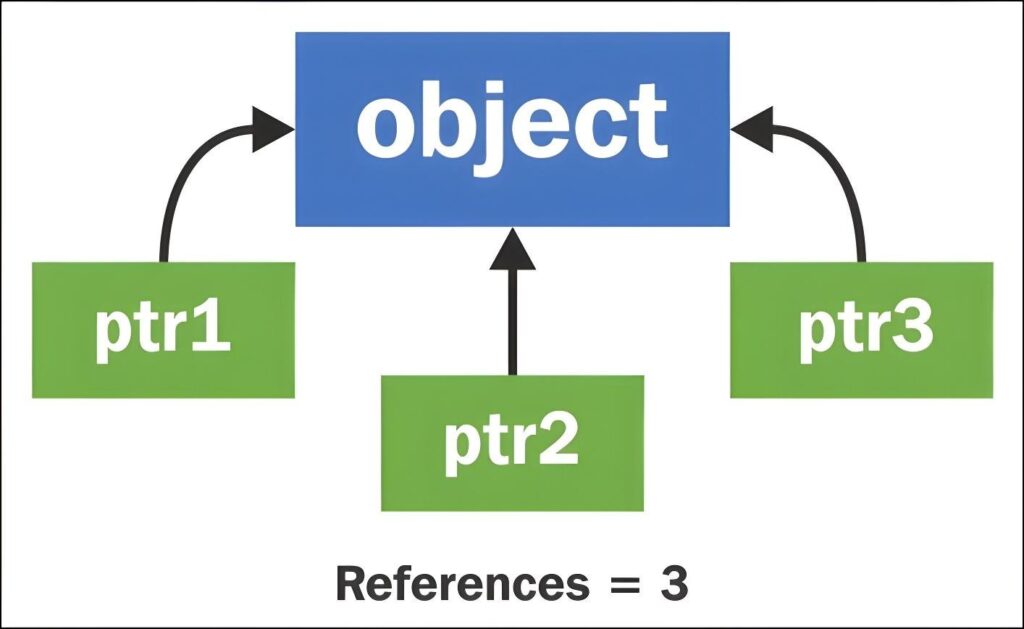
Smart Pointers (TSharedPtr, TWeakPtr, TUniquePtr): Avoid raw C++ pointers where possible, especially for managing object lifetimes. Unreal’s smart pointers provide robust memory management and prevent common issues like dangling pointers and memory leaks. TSharedPtr for shared ownership, TWeakPtr for non-owning references to shared objects (to break circular dependencies), and TUniquePtr for exclusive ownership are indispensable tools. (Source: Unreal Engine Documentation, “Smart Pointers”, 2023).
Const Correctness: Use const extensively to indicate that a function or variable will not modify the data it operates on. This improves code readability, helps the compiler optimize, and prevents accidental modifications. For example, a function that only reads an Actor’s properties should take a const AActor* or const FVector& argument.
Proper Use of Unreal’s Reflection System (UCLASS, USTRUCT, UPROPERTY, UFUNCTION): Understand and correctly utilize Unreal’s reflection macros. These macros are not just for exposing properties to Blueprints; they are fundamental to Unreal’s garbage collection, serialization, and editor integration. Incorrect usage can lead to subtle bugs, memory leaks, or objects not being properly garbage collected. For instance, always mark UObjects and Actors with UPROPERTY() if they are owned by another UObject or Actor to ensure they are tracked by the garbage collector.
Minimizing Dynamic Memory Allocations: Frequent new/delete operations (or their Unreal equivalents) can lead to performance spikes and memory fragmentation. Prefer using Unreal’s container classes (TArray, TMap, TSet) which are optimized for game development and often pre-allocate memory. When dynamic allocation is unavoidable, consider using object pools for frequently created and destroyed objects.
Error Handling and Assertions: Implement robust error handling. Use check() and ensure() for assertions. check() will crash the game in development builds if its condition is false, providing immediate feedback. ensure() will log an error but allow the game to continue, useful for non-critical errors that should be investigated. Avoid silent failures; if an operation can fail, handle the failure gracefully or log it prominently.
Blueprint Best Practices: Bridging the Gap
Blueprints are incredibly powerful for rapid prototyping, visual scripting, and empowering designers. However, their ease of use can lead to complex, unmaintainable graphs if not managed carefully.
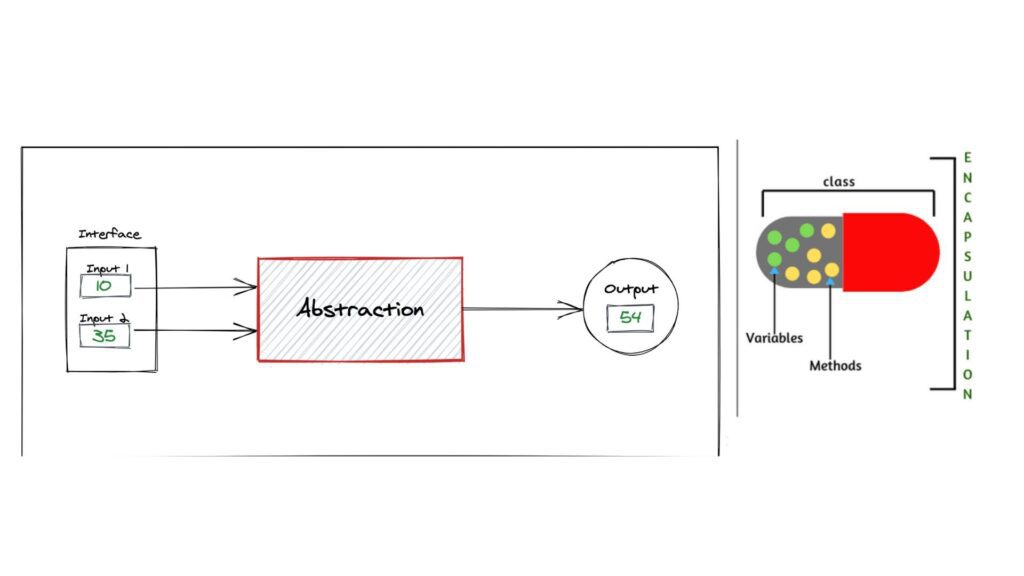
Encapsulation and Abstraction: Treat Blueprints like C++ classes. Encapsulate complex logic within functions or macros. Avoid sprawling event graphs. If a sequence of nodes performs a specific task, wrap it in a function. If that task is reusable across multiple Blueprints, consider a Blueprint Function Library or a C++ static function exposed to Blueprints.
Clear Naming Conventions: Consistent and descriptive naming for variables, functions, events, and nodes is crucial. This significantly improves readability, especially when multiple team members are working on the same Blueprints. For example, “PlayerHealth” instead of “HP”, “CalculateDamage” instead of “DoStuff”.
Comments and Reroute Nodes: Use comments liberally to explain complex logic, assumptions, or non-obvious connections. Reroute nodes (Ctrl+Click on a wire) can dramatically improve the visual clarity of Blueprint graphs by organizing wires and reducing spaghetti. Use them to group related wires or to guide the eye through complex logic flows.
Data-Driven Design in Blueprints: Instead of hardcoding values in Blueprints, use Data Tables, Data Assets, or Configuration files. This allows designers to tweak game parameters without modifying Blueprint logic, reducing the risk of introducing bugs and speeding up iteration. For example, weapon stats, enemy properties, or level parameters should be driven by data assets.
When to Use C++ vs. Blueprints: A common guideline is to implement performance-critical logic, complex algorithms, and core game systems in C++. Blueprints are ideal for visual scripting, rapid prototyping, UI logic, and exposing designer-facing parameters. If a Blueprint graph becomes excessively large, difficult to read, or performance-intensive, it’s a strong indicator that parts of it should be refactored into C++.
Testing and Validation: Ensuring Robustness
High-quality code is not just about how it’s written, but also how it’s validated.
Unit Testing: While traditionally less common in game development than in enterprise software, unit testing for core game logic (e.g., combat calculations, inventory management, AI decision-making) can significantly improve code quality. Unreal Engine provides a built-in Automation Test Framework. Writing tests for critical C++ functions ensures that changes don’t inadvertently break existing functionality. (Source: Unreal Engine Documentation, “Automation System”, 2023).
Integration Testing: Test how different systems interact. This often involves creating specific test levels or scenarios to validate complex feature sets. For example, testing how a player’s inventory interacts with a crafting system and a vendor system.
Code Reviews: Implement a rigorous code review process. Having other developers review your code catches bugs, identifies potential performance issues, and ensures adherence to coding standards. This is one of the most effective ways to disseminate knowledge and elevate the overall quality of the codebase across the team.
Static Analysis Tools: Utilize static analysis tools (e.g., PVS-Studio, SonarQube, or even built-in compiler warnings) to identify potential bugs, code smells, and adherence to coding standards before runtime. These tools can catch issues like uninitialized variables, memory leaks, and potential null pointer dereferences. (Source: PVS-Studio Blog, “Unreal Engine Code Analysis”, 2022).
Performance Optimization: A Continuous Endeavor
Code quality in game development is inextricably linked to performance. Even perfectly structured code can be slow if not optimized.
Profiling (Unreal Insights, CPU/GPU Profilers): Regularly profile your game using Unreal Insights, the CPU profiler, and GPU profiler. Don’t guess where performance bottlenecks are; measure them. Identify hot spots in your code and focus optimization efforts there. (Source: Unreal Engine Documentation, “Unreal Insights”, 2023).
Batching and Instancing: For rendering, utilize instanced static meshes for large numbers of identical objects (e.g., foliage, rocks). For CPU-bound tasks, try to batch operations to reduce overhead. For example, instead of calling a function on 1000 individual Actors, gather their data and process it in a single loop.
Asynchronous Operations and Multi-threading: Offload heavy computations (e.g., pathfinding, complex AI, procedural generation) to worker threads to avoid blocking the game thread. Unreal Engine provides tools like Async Tasks and the Task Graph system to facilitate multi-threading. However, multi-threading introduces complexity (race conditions, deadlocks), so use it judiciously and with careful synchronization.
Memory Management: Be mindful of memory usage. Large textures, unoptimized meshes, and excessive object creation can lead to high memory footprints and performance issues, especially on consoles with limited RAM. Use Unreal’s memory profiler to identify memory hogs.
Key Takeaways:
- Architectural Purity: Design for scalability and maintainability using modularization, loose coupling, and principles like DOD/ECS.
- C++ Mastery: Leverage smart pointers, const correctness, proper reflection usage, and minimize dynamic allocations.
- Blueprint Discipline: Encapsulate logic, use clear naming, comment extensively, and prefer data-driven approaches.
- Rigorous Testing: Implement unit tests, integration tests, code reviews, and static analysis.
- Continuous Optimization: Profile regularly, utilize batching/instancing, and strategically employ multi-threading.
By consistently applying these expert-level strategies, game development teams can build robust, performant, and maintainable Unreal Engine projects that stand the test of time and deliver exceptional player experiences.